

Switching managed IT providers can feel like a major undertaking, especially when your business depends on technology for daily operations. Concerns about downtime, lost data, cybersecurity gaps, and employee disruptions often cause organizations to remain with an IT provider that no longer meets their needs.
However, staying with an underperforming provider can create its own problems. Slow support response times, recurring technical issues, inadequate security measures, and limited strategic guidance can affect productivity and increase operational costs.
The good news is that changing IT support companies doesn’t have to disrupt your business. With proper planning, clear communication, and an experienced managed service provider (MSP), organizations can transition their IT services while maintaining business continuity.
Here’s how to switch managed IT providers successfully and what to consider before making the change.
When Should You Consider Switching Managed IT Providers?
Not every technical issue warrants changing providers. However, persistent problems may indicate that your current IT support arrangement is no longer meeting your organization’s needs.
Common warning signs include:
- Slow response times: Employees regularly wait too long for technical assistance, resulting in lost productivity.
- Recurring IT problems: The same network, software, or hardware issues continue appearing without permanent solutions.
- Limited cybersecurity protection: Your provider lacks proactive monitoring, security assessments, or effective incident response capabilities.
- Poor communication: You receive little visibility into system performance, unresolved tickets, or upcoming technology needs.
- Unpredictable costs: Unexpected charges make IT budgeting difficult.
- Lack of strategic guidance: Your provider focuses on fixing problems rather than helping your business plan for growth.
Understanding the difference between reactive troubleshooting and proactive technology management can help determine whether a change is necessary. We explore this distinction in our article, Reactive vs. Proactive IT Support: Which Approach Costs Your Business More?.
If these challenges consistently affect your operations, evaluating alternative providers may be worthwhile.
What Happens When You Change IT Support Companies?
A managed IT provider transition involves transferring responsibility for your organization’s technology environment from one provider to another.
Depending on your infrastructure, this may include network administration, server management, cloud services, cybersecurity tools, backups, user accounts, software licensing, and technical support.
The process should begin with an assessment of your existing environment. Your incoming provider needs to understand which systems are business-critical, how they are configured, and what dependencies must be maintained.
A structured transition also establishes clear responsibilities between your business, the outgoing provider, and the incoming IT team.
The objective isn’t necessarily to replace every existing technology solution. Instead, the new provider should evaluate what works, identify weaknesses, and recommend improvements based on your operational requirements.
6 Steps to Switching Managed IT Providers Without Downtime
While every organization’s technology environment is different, following a structured transition process can significantly reduce the risk of disruptions.
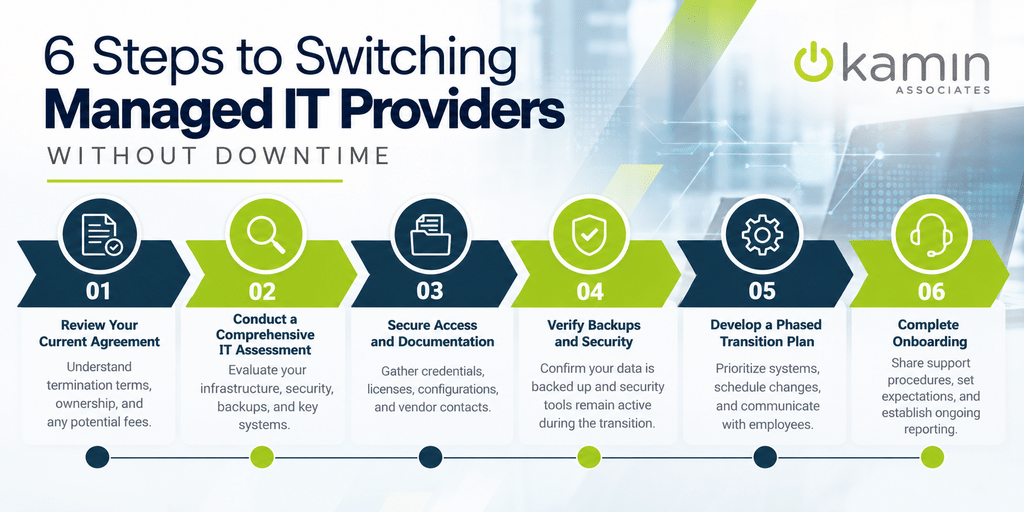
1. Review Your Current IT Service Agreement
Before selecting a replacement provider, review your existing contract to understand termination requirements, notice periods, and potential fees.
Determine who owns your hardware, software licenses, administrative accounts, and documentation. Some services may be managed through your current provider’s accounts, requiring additional coordination before the transition.
Understanding these obligations early helps prevent unexpected costs or delays.
2. Conduct a Comprehensive IT Assessment
Your incoming provider should evaluate your current infrastructure before assuming responsibility.
This assessment may include:
- Servers, workstations, and network equipment
- Microsoft 365 and other cloud environments
- Firewalls, endpoint protection, and security configurations
- Data backups and disaster recovery procedures
- Software licensing and vendor relationships
- Existing technical issues and infrastructure vulnerabilities
A thorough assessment helps identify dependencies that could otherwise be overlooked.
We provide IT Infrastructure Services designed to help businesses evaluate, manage, and improve their technology environments.
3. Secure Administrative Access and Documentation
One of the most important steps when switching managed IT providers is ensuring your business maintains control over its technology.
Your incoming provider will need appropriate access to administrative accounts, network configurations, cloud platforms, domain management, and critical business applications.
Before the transition, establish an inventory of required credentials, licenses, configurations, and vendor contacts.
Sensitive credentials should be transferred through secure methods rather than ordinary email. Once responsibilities change, unnecessary access belonging to the previous provider should be revoked or updated.
Proper documentation helps the new IT team understand your environment and reduces dependence on undocumented configurations.
4. Verify Backups and Cybersecurity Protections
Changing IT providers should never compromise your organization’s ability to recover critical information.
Before modifying systems or replacing management tools, verify that important business data is backed up and that recovery procedures are functional.
Businesses should also confirm whether existing cybersecurity services will remain active during the transition.
This includes endpoint protection, firewall management, security monitoring, identity management, and other essential safeguards.
Avoid creating gaps between the removal of existing security tools and the deployment of replacements.
For additional guidance, read our article, Why Every Business Needs an IT Disaster Recovery Plan Before Disaster Strikes.
5. Develop a Phased IT Transition Plan
Attempting to change every system simultaneously can introduce unnecessary operational risks.
A phased approach allows your incoming provider to establish monitoring, confirm administrative access, and gradually assume responsibility for critical services.
The transition plan should identify:
- Systems requiring immediate attention
- Responsibilities assigned to each provider
- Scheduled maintenance windows
- Employee communication procedures
- Testing and validation requirements
- Contingency plans if unexpected issues occur
Whenever possible, schedule higher-risk changes outside peak business hours.
Some overlap between providers may be beneficial, particularly for organizations with complex infrastructure or specialized applications.
Although no transition can guarantee zero downtime, careful sequencing and testing can help minimize interruptions.
6. Complete Onboarding and Establish Support Expectations
Once the incoming provider assumes responsibility, employees need to understand how to request assistance.
Communicate updated helpdesk contact information, support procedures, and escalation processes throughout your organization.
The new provider should also establish expectations around ticket handling, system monitoring, maintenance, and ongoing reporting.
Our IT Support Services should provide employees with reliable technical assistance while helping leadership maintain visibility into technology performance.
Following onboarding, review outstanding issues and establish priorities for future improvements.
Common Mistakes to Avoid During an IT Provider Transition
Even a well-planned transition can encounter challenges when important details are overlooked.
Canceling existing services too early: Ending monitoring, backup, or security subscriptions before replacements are operational can expose your business to unnecessary risk.
Failing to verify account ownership: Businesses should confirm they control their domains, cloud subscriptions, software licenses, and critical administrative accounts.
Overlooking third-party vendors: Internet providers, telecommunications companies, software vendors, and cloud platforms may require coordination during the transition.
Skipping employee communication: Without clear instructions, employees may not know where to report technical problems or whom to contact for assistance.
Making unnecessary infrastructure changes: A provider transition doesn’t automatically require replacing functional hardware or migrating every application.
Avoiding these mistakes helps maintain stability while giving your new IT partner a stronger foundation for ongoing management.
What to Look for in Your Next Managed IT Provider
Choosing the right replacement provider is just as important as planning the transition itself.
Look for an MSP that offers proactive monitoring, responsive support, cybersecurity expertise, and a clear approach to infrastructure management.
Transparency is also essential. Your provider should explain service responsibilities, support expectations, pricing, and recommended improvements without unnecessary complexity.
Businesses should evaluate whether prospective providers can support their existing infrastructure while accommodating future growth.
Cybersecurity deserves particular attention. We offer comprehensive IT Security Services to help organizations address network vulnerabilities, endpoint protection, cloud security, and data protection requirements.
Finally, consider the provider’s approach to long-term planning. Technology should support business objectives rather than simply generate another monthly expense.
Make Your IT Provider Transition Easier With Us
Switching managed IT providers doesn’t have to mean starting over with your technology. With the right preparation and support, businesses can address ongoing IT frustrations while improving the reliability, security, and management of their systems.
We help businesses throughout San Antonio evaluate their technology needs and develop practical solutions through our Managed IT Solutions.
From helpdesk support and infrastructure management to cybersecurity and cloud services, we provide the expertise businesses need to maintain dependable technology environments.
If your current IT provider isn’t meeting expectations, it may be time to explore a better approach.
Ready to make a change? Contact us to discuss your current IT challenges and learn how our experienced managed IT support can help your business move forward with confidence.