
Reliable Wi-Fi is essential for modern business operations. From cloud-based applications and video conferencing to VoIP phones and connected devices, businesses depend on consistent wireless connectivity to keep employees productive and customers satisfied.
However, slow speeds, dropped connections, and inconsistent coverage can create daily frustrations that affect productivity and business performance. What initially appears to be an internet service provider issue may actually involve outdated equipment, poor network design, or problems within the company’s IT infrastructure.
Understanding the most common causes of business Wi-Fi problems can help organizations identify potential weaknesses and determine when professional network troubleshooting is necessary.
Why Reliable Business Wi-Fi Matters
Business wireless networks support far more than basic internet browsing. Employees rely on Wi-Fi to access shared files, collaborate through Microsoft 365, communicate with customers, and use cloud-based business applications.
When connectivity becomes unreliable, organizations may experience:
- Interrupted video conferences and VoIP calls
- Slow access to cloud applications
- Reduced employee productivity
- Disconnected printers and wireless devices
- Inconsistent connectivity across office locations
- Frustration for employees and visitors
For businesses with multiple departments, high device counts, or specialized technology requirements, network reliability becomes especially important.
A properly designed wireless network should provide consistent coverage, sufficient capacity, and appropriate security controls throughout the workplace.
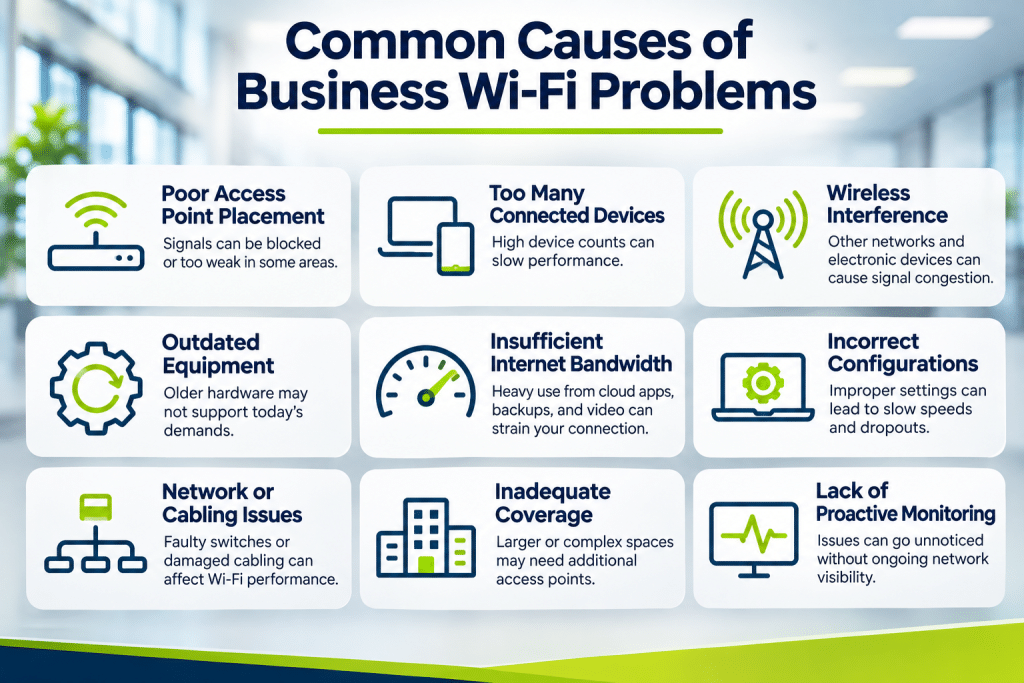
9 Common Causes of Business Wi-Fi Problems
1. Poor Wireless Access Point Placement
Wireless access points distribute Wi-Fi signals throughout a building. When installed in unsuitable locations, they may create weak coverage areas or inconsistent connectivity.
Walls, metal shelving, concrete structures, and other physical obstacles can interfere with wireless signals. Large offices, warehouses, and multi-floor buildings may require multiple access points to provide reliable coverage.
A professional wireless network assessment can help identify coverage gaps and determine whether access points need repositioning or expansion.
2. Too Many Devices Competing for Network Capacity
Modern workplaces often have dozens or hundreds of connected devices, including laptops, smartphones, printers, security cameras, and smart building systems.
When too many devices compete for limited wireless capacity, users may experience slower performance and intermittent connectivity.
Business network optimization may involve distributing devices across access points, adjusting wireless settings, or upgrading equipment to support increased demand.
3. Wireless Interference
Wi-Fi networks operate on radio frequencies that can experience interference from nearby wireless networks, electronic equipment, and other devices.
In office buildings with multiple tenants, overlapping wireless networks can contribute to congestion and reduced performance.
Professional network troubleshooting can identify interference sources and help determine appropriate channel configurations, frequency bands, and access point settings.
4. Outdated Wireless Networking Equipment
Older routers and wireless access points may struggle to support modern applications and growing numbers of connected devices.
Outdated equipment can also lack newer wireless capabilities, security improvements, and management features.
Businesses experiencing recurring connectivity problems should evaluate the age, capabilities, and support status of their networking hardware.
Kamin Associates’ IT Infrastructure Services can help businesses evaluate their technology environment and identify infrastructure improvements.
5. Insufficient Internet Bandwidth
Sometimes slow business Wi-Fi is caused by limitations in the internet connection rather than the wireless network itself.
Cloud backups, large file transfers, video meetings, and other bandwidth-intensive activities can place significant demands on business internet connections.
Network troubleshooting should distinguish between wireless performance problems and internet service limitations before recommending upgrades.
This helps businesses avoid purchasing unnecessary equipment or increasing internet costs without addressing the underlying issue.
6. Incorrect Network Configurations
Improperly configured wireless networks can cause connectivity problems even when the equipment itself is functioning correctly.
Common configuration concerns include incorrect channel settings, overlapping coverage areas, outdated firmware, and improperly configured network segmentation.
Businesses may also experience issues when guest networks and employee devices share resources without appropriate traffic management.
Professional IT support can help evaluate network configurations and identify adjustments that improve reliability and security.
7. Faulty Network Switches or Structured Cabling
Not every Wi-Fi problem originates from wireless equipment.
Access points depend on wired connections to communicate with the broader network. Damaged Ethernet cables, failing switches, or insufficient Power over Ethernet capacity can affect wireless performance.
These issues may cause intermittent disconnections, reduced speeds, or complete access point outages.
Kamin Associates provides Structured Cabling Services to help businesses establish reliable physical connections that support their networking infrastructure.
8. Inadequate Coverage in Large or Complex Buildings
Office layouts can change as businesses expand, relocate departments, or add new equipment.
A wireless network designed for a smaller workspace may no longer provide adequate coverage after renovations or organizational growth.
Warehouses, medical offices, professional service firms, and multi-story facilities can present additional connectivity challenges because of building materials and physical layouts.
Wireless site surveys can help determine whether existing infrastructure provides appropriate signal strength and capacity throughout the facility.
9. Lack of Proactive Network Monitoring
Many businesses only investigate Wi-Fi problems after employees begin reporting frequent interruptions.
Without ongoing monitoring, developing issues such as overloaded access points, hardware failures, or unusual network activity may remain unnoticed.
Proactive network monitoring helps IT teams identify performance trends, evaluate equipment health, and investigate potential problems before they become widespread disruptions.
Businesses can benefit from ongoing IT Support Services that help maintain reliable technology operations.
Is the Problem Your Business Wi-Fi or Internet Provider?
Before replacing networking equipment, businesses should determine where connectivity problems originate.
If devices connected through Ethernet experience normal speeds while wireless devices struggle, the issue may involve Wi-Fi coverage, interference, or access point performance.
If both wired and wireless devices experience similar problems, the cause may involve the internet connection, network firewall, or another shared infrastructure component.
A professional business network assessment can evaluate these factors and identify the source of performance issues.
When Should a Business Upgrade Its Wireless Network?
Not every connectivity problem requires a complete network replacement. Configuration adjustments, equipment repositioning, or targeted hardware upgrades may resolve certain issues.
However, businesses should consider a wireless network upgrade when existing infrastructure cannot support increasing device counts, modern applications, or expanded office space.
Organizations should also evaluate whether networking equipment continues receiving manufacturer security updates and supports current business requirements.
Planning upgrades proactively can help reduce unexpected disruptions and support future growth.
Improve Business Network Reliability With Kamin Associates
Reliable business Wi-Fi requires more than a strong internet connection. Wireless access points, switches, cabling, network configurations, and ongoing management must work together to support daily operations.
Kamin Associates helps businesses evaluate and maintain the IT infrastructure that supports dependable connectivity and workplace productivity.
Whether your organization is experiencing recurring wireless interruptions, expanding its office, or evaluating aging network equipment, professional IT support can help identify practical improvements.
Improve your business network performance with Kamin Associates. Visit kamin.us to learn more about IT infrastructure and support services.