For many businesses, technology has become too important and too complex to manage on an as-needed basis. Employees depend on reliable devices, networks, cloud applications, cybersecurity tools, and technical support every day. As those technology needs grow, so does the challenge of managing them.
That often leads business owners to consider managed IT services. But before choosing a provider, there is an obvious question: How much do managed IT services cost?
The answer depends on your organization. Company size, number of users, technology environment, cybersecurity requirements, infrastructure, and the level of support you need can all influence managed IT services pricing.
Understanding those variables can help San Antonio businesses evaluate providers, compare proposals, and determine what they are actually getting for their IT investment.
What Are Managed IT Services?
Managed IT services involve outsourcing some or all of your organization’s technology management to an external IT provider.
Instead of contacting someone only after technology stops working, a managed IT provider takes an ongoing role in maintaining, monitoring, supporting, and securing the IT environment.
Depending on the agreement, managed IT solutions may include:
- Help desk and user support
- Device and asset management
- Network monitoring
- Server management
- Software updates and patching
- Cybersecurity
- Cloud management
- Backup and business continuity
- IT documentation
- Technology planning
- Infrastructure management
The exact combination of services depends on the organization and provider.
For businesses evaluating whether outsourcing makes sense in the first place, our guide to outsourced IT support vs. in-house IT provides a closer look at the differences between the two approaches.
How Are Managed IT Services Priced?
There isn’t one universal managed IT services pricing model. Providers structure their services differently based on what they manage and how much support a client requires.
Some common pricing approaches include per-user, per-device, tiered, and flat-rate models.
A per-user model bases pricing on the number of employees or users receiving IT support. This can make budgeting easier for organizations where employees use multiple devices.
A per-device model bases costs on the number of computers, servers, network devices, or other assets being managed.
Some providers use tiered packages, where businesses select from different service levels depending on the amount of monitoring, support, security, or management they need.
Others develop customized agreements around the organization’s environment.
Rather than evaluating pricing alone, businesses should determine exactly what is included in each proposal. A lower monthly price may not represent a lower overall technology cost if essential services are excluded.
What Factors Affect Managed IT Services Cost?
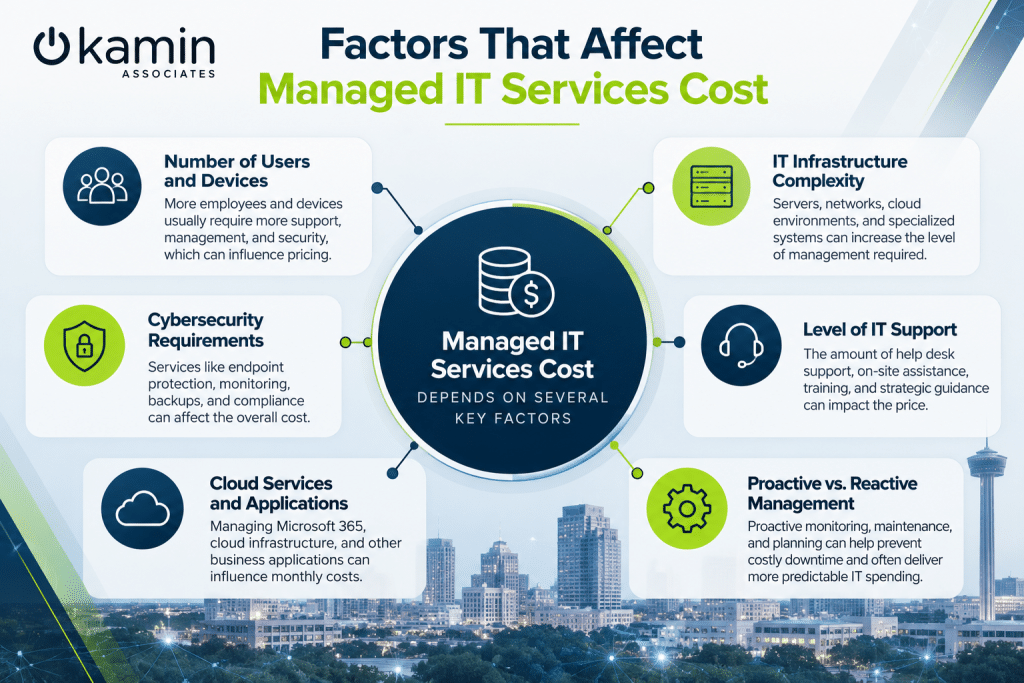
Several factors can influence what your organization pays for managed IT services.
1. Number of Users and Devices
A 15-person company typically has a different support workload than an organization with 150 employees.
More employees usually mean more accounts, computers, applications, permissions, support requests, and potential security concerns.
The number and type of devices also matter. Servers, workstations, laptops, mobile devices, switches, firewalls, and other technology may all require monitoring and maintenance.
Proper IT asset management can help organizations understand what technology they have and what needs to be managed.
2. Complexity of Your IT Infrastructure
Two businesses with the same number of employees can have very different technology requirements.
One may operate almost entirely through cloud applications, while another maintains servers, specialized software, multiple offices, complex networks, or industry-specific systems.
Managing a more complicated environment generally requires additional expertise and resources.
Professional IT infrastructure services can cover areas such as network management, servers, cloud environments, monitoring, maintenance, and other systems that keep business technology operating.
Infrastructure age matters as well. Older equipment can require additional maintenance and may create reliability, compatibility, or security concerns. Our article on how outdated hardware quietly slows down your business explains why aging technology can create costs beyond the price of replacement equipment.
3. Cybersecurity Requirements
Cybersecurity can significantly affect the scope of a managed IT agreement.
Modern businesses may need endpoint protection, network security, access controls, vulnerability management, security monitoring, backups, employee awareness training, and other safeguards.
Organizations handling sensitive information or operating under regulatory requirements may need additional controls.
Kamin Associates’ IT security services are designed to address areas including network, endpoint, data, application, and cloud security.
Businesses should determine whether security services are included in a managed IT proposal or priced separately. Comparing two providers based only on the monthly fee can be misleading when their security offerings differ substantially.
4. Level of IT Support
The amount of support included can also affect pricing.
Some organizations primarily need remote help desk assistance. Others require a broader combination of user support, infrastructure management, asset management, IT service management, documentation, training, and strategic guidance.
Kamin’s IT support services include help desk and user support, IT asset management, IT service management, and training and knowledge management.
Businesses should also ask when support is available and what happens outside normal business hours.
5. Reactive vs. Proactive Management
The way IT is managed can influence costs beyond the provider’s monthly invoice.
Reactive IT focuses on addressing problems after something goes wrong. Proactive management emphasizes monitoring, maintenance, updates, documentation, and planning intended to identify issues earlier.
As discussed in our guide to reactive vs. proactive IT support, waiting for technology failures can expose businesses to downtime and productivity losses that aren’t always visible in an IT budget.
When evaluating managed IT pricing, consider the potential cost of disruption in addition to the direct cost of support.
What Should Be Included in a Managed IT Services Quote?
Before comparing providers, make sure you understand exactly what each proposal covers.
Ask whether the agreement includes monitoring, patch management, help desk support, cybersecurity tools, backups, cloud management, documentation, strategic planning, and infrastructure management.
You should also understand how projects are handled.
For example, replacing a server, moving offices, implementing a new cloud platform, or upgrading network infrastructure may fall outside a standard monthly agreement.
Clear expectations make it easier to compare proposals accurately and reduce the likelihood of unexpected expenses later.
Is the Cheapest Managed IT Provider the Best Choice?
Price matters, but it shouldn’t be the only consideration.
Businesses rely on IT providers to manage systems that affect productivity, security, communication, and access to important information. The services included, technical expertise, response process, security capabilities, and ability to support future growth all deserve consideration.
An inexpensive agreement that excludes critical services may eventually cost more if the organization regularly pays additional fees or experiences recurring technology problems.
The goal isn’t simply to find the lowest monthly IT bill. It is to find an IT approach that provides the appropriate level of support while making technology spending more predictable.
How Can San Antonio Businesses Choose the Right Managed IT Provider?
Start by evaluating your current environment.
How many users and devices do you have? Which systems are critical to operations? Where are recurring problems occurring? Are there cybersecurity concerns? Is your infrastructure prepared for growth?
From there, look for an IT provider that takes the time to understand those requirements rather than immediately recommending a one-size-fits-all package.
If you’re still comparing providers, our guide to choosing managed IT services in San Antonio covers additional factors businesses should consider before making a decision.
Get Managed IT Services Built Around Your Business
There is no single managed IT services price that makes sense for every organization.
The right investment depends on your users, infrastructure, security requirements, support needs, and long-term business goals. Understanding those factors gives you a much better foundation for evaluating proposals and determining which services actually provide value.
Kamin Associates provides managed IT, infrastructure, support, cloud, and cybersecurity solutions for businesses in San Antonio. Rather than forcing every organization into the same technology package, we work to develop solutions around each client’s specific environment and requirements.
Ready to find out what managed IT services could look like for your organization? Contact Kamin Associates to discuss your IT environment, support needs, and business goals.